
Importing Namespaces
TOC
OverviewUse CasesPrerequisitesProcedureImporting namespaces by using new web consoleRelated guidanceOverview
Namespace Lifecycle Management Capabilities:
- Cross-Cluster Namespace Import: Importing Namespaces into a Project centralizes their management across all Kubernetes Clusters provisioned by the platform. This provides administrators with unified resource governance and monitoring capabilities across distributed environments.
Namespace Disassociation:
-
The Disassociate Namespace feature enables you to unlink a Namespace from its current Project, resetting its association for subsequent reassignment or cleanup.
-
Importing a Namespace into a Project grants it capabilities equivalent to those of natively created Namespaces on the platform. This includes inherited Project-level Policies (e.g., Resource Quotas), unified monitoring, and centralized governance controls.
Important Notes:
- A Namespace can only be associated with one Project at any given time.
- If a Namespace is already linked to a Project, it cannot be imported into or reassigned to another Project without first disassociating it from its original Project.
Use Cases
Common use cases for Namespace management include:
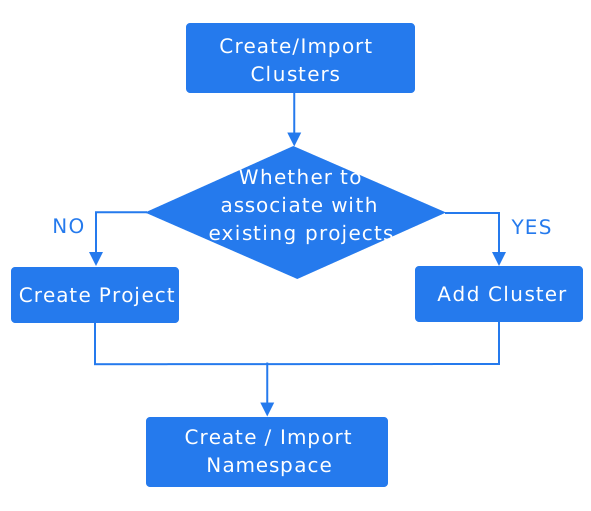
- Upon connecting a new Kubernetes cluster to the platform, you can utilize the Import Namespace feature to associate its existing Kubernetes Namespaces with a Project. Simply select the target Project and Cluster to initiate the import. This action grants the project governance over these namespace, encompassing Resource Quotas, monitoring, and policy enforcement.
-
A namespace that has been disassociated from one project can be seamlessly re-associated with another project via the Import Namespace feature for continued centralized governance.
-
Namespaces not currently managed by any project (e.g., those created via cluster-level scripts) must be linked to a target project using the Import Namespace feature to enable platform-level governance, including visibility and centralized management.
Prerequisites
- The Namespace is not currently managed by any existing Project within the platform.
- Namespaces can only be imported into a Project that is already associated with their target Kubernetes Cluster. If no such Project exists, you must first provision a Project linked to that Cluster.
Procedure
- Project Management, click on the Project name where the namespace is to be imported.
- Navigate to Namespaces > Namespaces.
- Click on the Dropdown button next to Create Namespace, then select Import Namespace.
- Refer to the Creating Namespaces documentation for parameter configuration details.
- Click Import.
Importing namespaces by using new web console
The new web console keeps namespace import in the Applications view because import is a project-scoped governance action.
When you use that workflow:
- Start from the target project and open Namespaces.
- Use Import Namespace only for namespaces in clusters already associated with the current project.
- Review the namespace state before import so that monitoring, quota governance, and policy expectations still make sense after association.
- Verify after import that the namespace appears in the current project and remains associated with the expected cluster.
Related guidance
For project-scoped namespace governance, continue with the namespace pages in this section:
If you need background information about the product UI entry and scope, see Web Console.